Braiv Lipsync

AI-powered lipsync for natural dubbed video

Synchronize mouth movements with translated audio automatically — so dubbed videos look native to every market.

Trusted by 100,000+ creators, podcasters & businesses globally
Part of the Braiv workflow
domaine homes logo
puma logo
tesla logo
micd-up logo
antler logo
canva logo
thirdi logo
screenapp logo
anchored outdoors logo
domaine homes logo
puma logo
tesla logo
micd-up logo
antler logo
canva logo
thirdi logo
screenapp logo
anchored outdoors logo

What you can do

Explore each capability in depth — click through to the full feature breakdown.

AI lipsync options

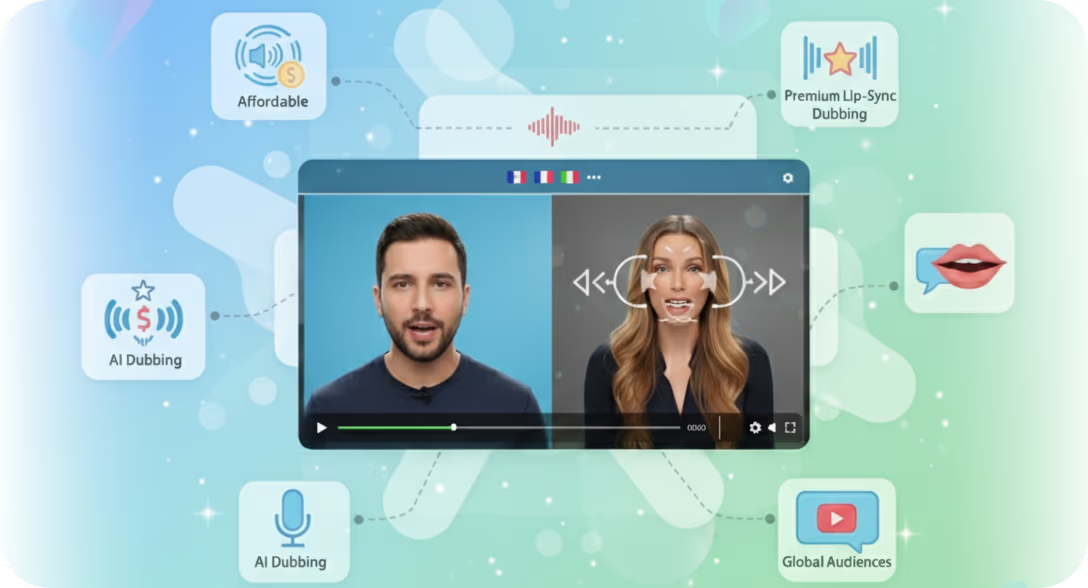
Synchronize dubbed speech with on-screen lip movements using AI lipsync options for more natural translated videos.

Nothing breaks viewer immersion faster than out-of-sync audio. Braiv's optional AI lip-sync engine visually alters the speaker's mouth movements to perfectly match the newly dubbed language.

  • Affordable AI lipsync
  • Industry leading AI lipsync
  • 10 minute lipsync
Learn more
Multilingual Video Hosting

Host, organise, and deliver multilingual videos with subtitles, dubbing, and language switching in one platform.

Consolidate your global video assets. Braiv Player hosts your original video, dubbed audio tracks, and translated subtitles all in one intelligent package.

  • Multi-language AI dubbing
  • Video library folders
  • Modern animated captions
Learn more
Auto publish to multiple channels

Publish videos to multiple channels and platforms automatically to speed up team distribution workflows.

Streamline your content distribution with Braiv Connect. Link your YouTube accounts and push fully optimized, translated videos directly to your channels with a single click.

  • Connect & manage multiple YouTube channels
  • Package & publish viral YouTube content
  • Update existing YouTube videos
Learn more
Deep dive

Everything you need to know about Braiv Lipsync

How AI Lipsync Works

Braiv Lipsync analyzes the original speaker’s mouth movements frame by frame, then re-synthesizes them to match the timing and phonemes of the dubbed audio track. The result is a localized video where lip movements feel native — eliminating the uncanny “bad dub” effect that erodes viewer trust.

No manual keyframing or post-production editing is required. Upload your dubbed video and lipsync is applied automatically during export.

When to Use Lipsync

Not every video needs lipsync — but when the speaker is on-screen and the audience is paying attention to their face, it makes a dramatic difference. High-value use cases include:

  • Executive and spokesperson videos localized for international markets
  • Training content where instructor credibility depends on natural delivery
  • Marketing testimonials repurposed across language regions
  • Creator content where face-to-camera delivery is the format

Lipsync vs. Subtitles vs. Voice-Only Dubbing

Subtitles are cheapest but split viewer attention. Voice-only dubbing keeps eyes on screen but the mouth mismatch creates cognitive dissonance. Lipsync is the premium tier — fully synchronized audio and visual that feels like the speaker learned the language natively.

For teams scaling localization across dozens of videos, Braiv lets you choose the right tier per asset: subtitles for low-stakes internal content, dubbing for mid-tier, and lipsync for flagship customer-facing material.

Frequently asked questions

Does lipsync work with any language pair?
Yes. Braiv Lipsync works across all 80+ languages supported by Braiv Dubbing. The AI adapts mouth movements to the phoneme structure of the target language regardless of the source language.
How long does lipsync processing take?
Lipsync adds approximately 2-3 minutes of processing time per minute of video. A 10-minute training video typically completes in under 30 minutes including dubbing and lipsync together.
Can I preview lipsync before exporting?
Yes. After processing, you can preview the synced video directly in the Braiv editor. If you prefer voice-only dubbing for certain segments, you can toggle lipsync on or off per clip.
Is lipsync included in all plans?
Lipsync is available as a premium add-on to Braiv Dubbing. Trial accounts can preview lipsync on short clips before committing. Paid plans include lipsync credits scaled to your subscription tier.
Does it work on videos with multiple speakers?
Yes. Braiv identifies individual speakers and applies lipsync independently to each face, so multi-speaker panel discussions and interviews are handled automatically.

Ready to Take Your Content Global?

Join over 100,000 creators scaling their reach with Braiv.
Get 300 AI Credits when you sign up today.